
For Shopify stores Free scan, no signup
Find what stops shoppers buying.Fix it in your theme.
AccessComply scans your live store for what turns shoppers away, from text they cannot read to pages search engines cannot parse. Approve a fix and it is written into your theme, with the original saved and the page checked again. Not an overlay.
Free, no signup. Up to 10 pages, and most scans take 2 to 5 minutes.
Free plan: 3 fixes every 30 days, no card.
What every fix does
Written into your theme
Theme files and Shopify content, not a script on top
Original saved first
Every file and field a fix run changes
Checked again after
Only fixes a new scan confirms count
Undo any run
Put back only when you say so
What a fix looks like on a real store
452 of one store’s 474 contrast findings were a single footer colour.
Light green links on a dark green footer, at 4.33 to 1 where WCAG asks for 4.5, repeated on every page. Fixed finding by finding, that is hundreds of rules, or one rule that repaints the same link wherever else it appears.
AccessComply writes one rule, inside the footer section it measured, and moves the colour just far enough. With it in place, the footer findings cleared on every page we checked, and nothing new appeared.
To the eye, the same footer. To the contrast rule, a pass.
/* AccessComply: #b6c6c1 text on #2f5b4f
   raised to 4.52:1 (WCAG 1.4.3) */
html body #shopify-section-footer :is(
  .footer__link,
  a[aria-current="page"],
  strong
) {
  color: #bacac5;
}
The rule AccessComply wrote, with the store’s own footer section and selectors.
How a fix happens
Scan, approve, and a second look before anything counts.
Step 1
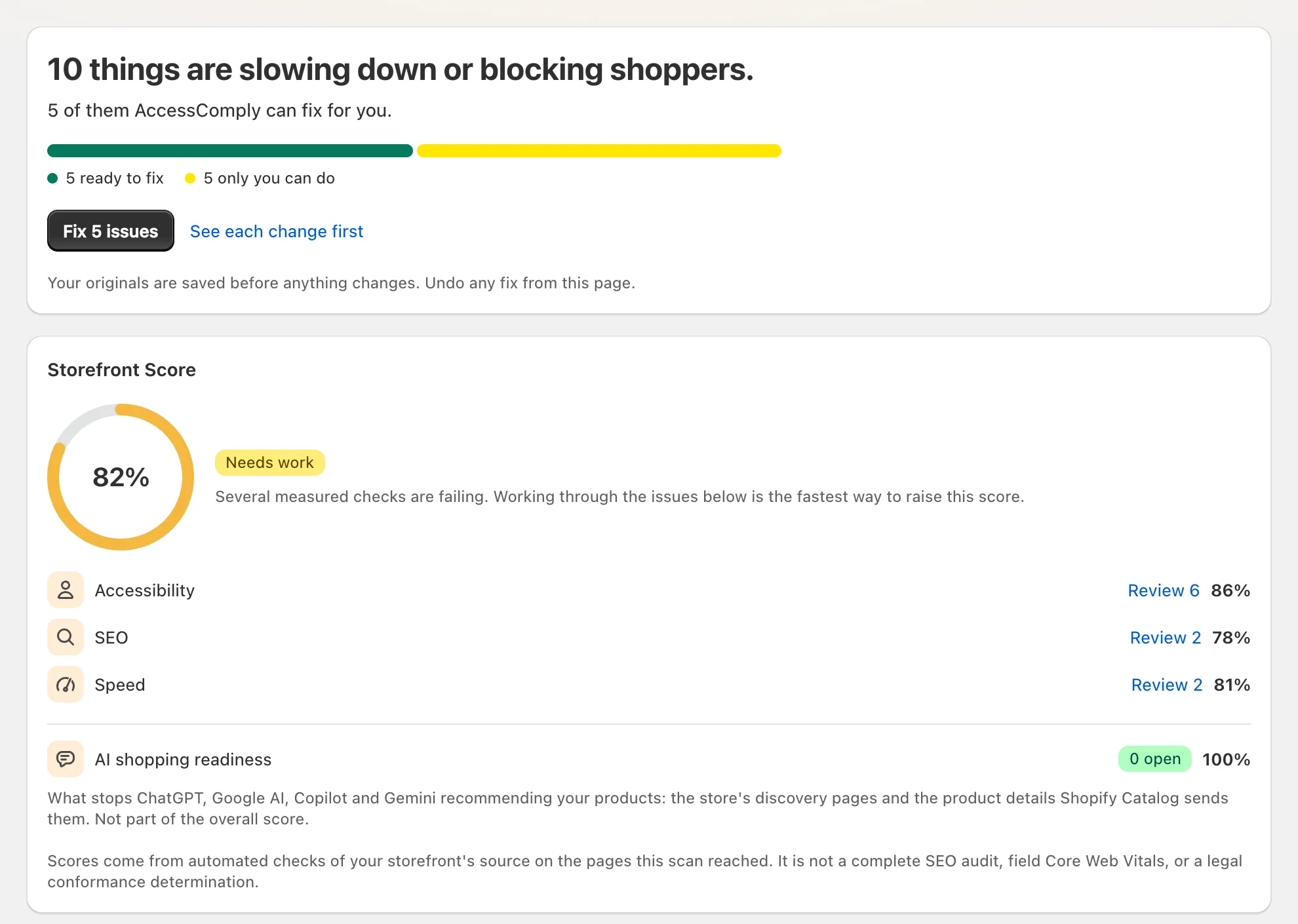
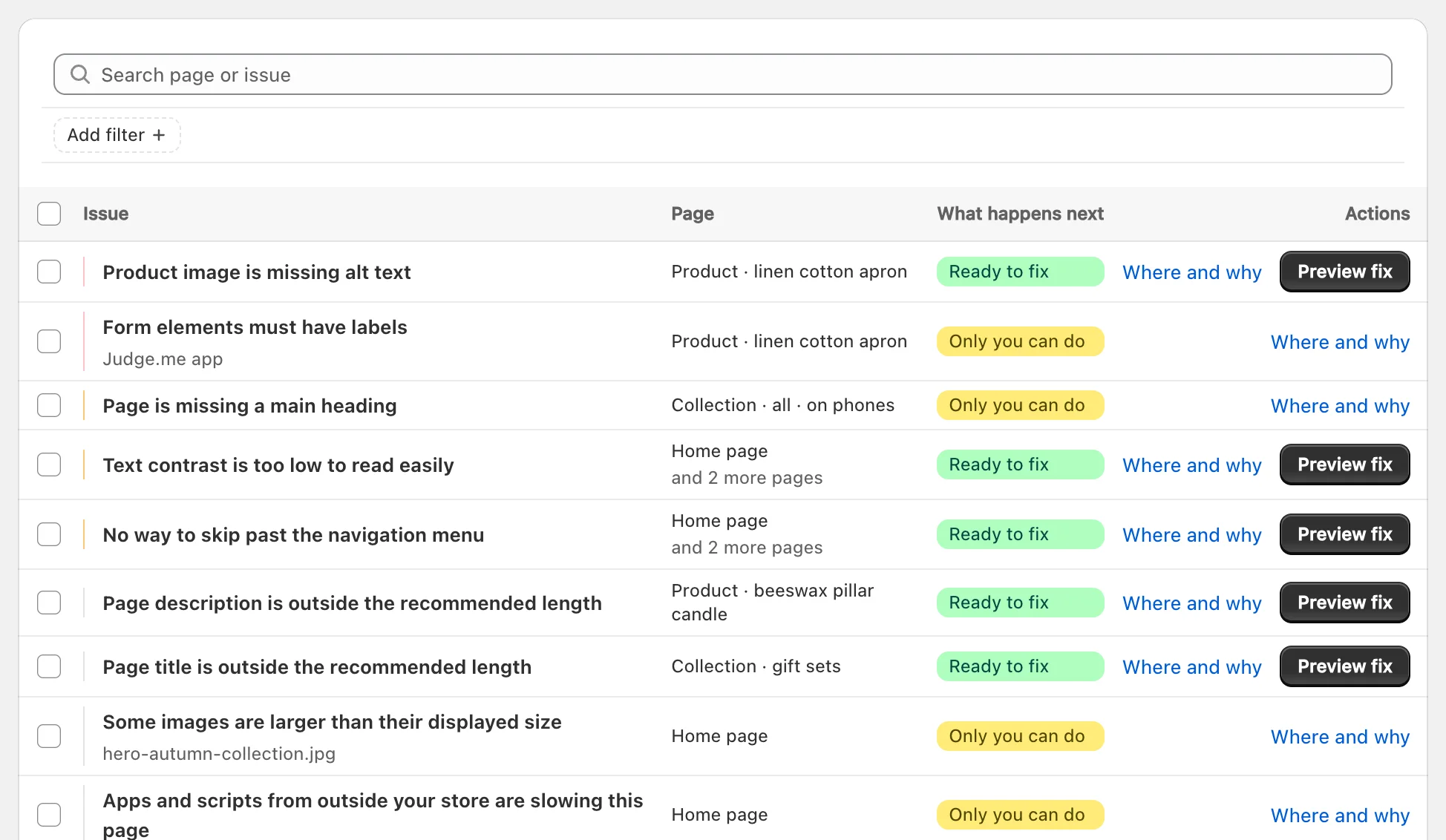
Every finding, tied to its page
Each issue names the page and the element, and says what happens next: ready to fix, worth a look first, or yours to do. Anything inside another app’s widget is named for that app, with what to ask its support.
Step 2
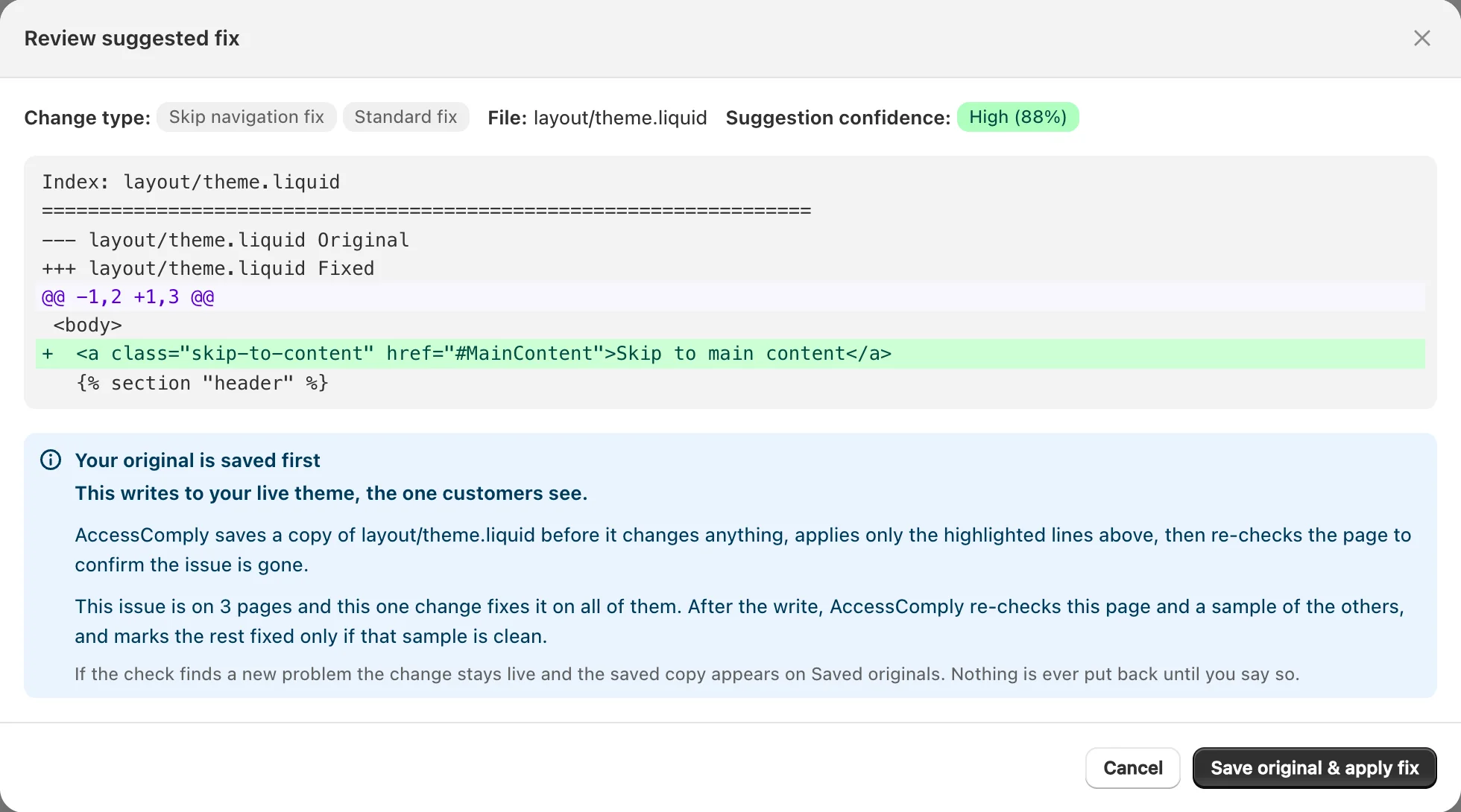
See the exact change, or approve a batch
Open any fix to read the change line by line, with the file it touches, before anything is written. Or approve every ready fix in one press. Nothing is written without your approval.
Step 3
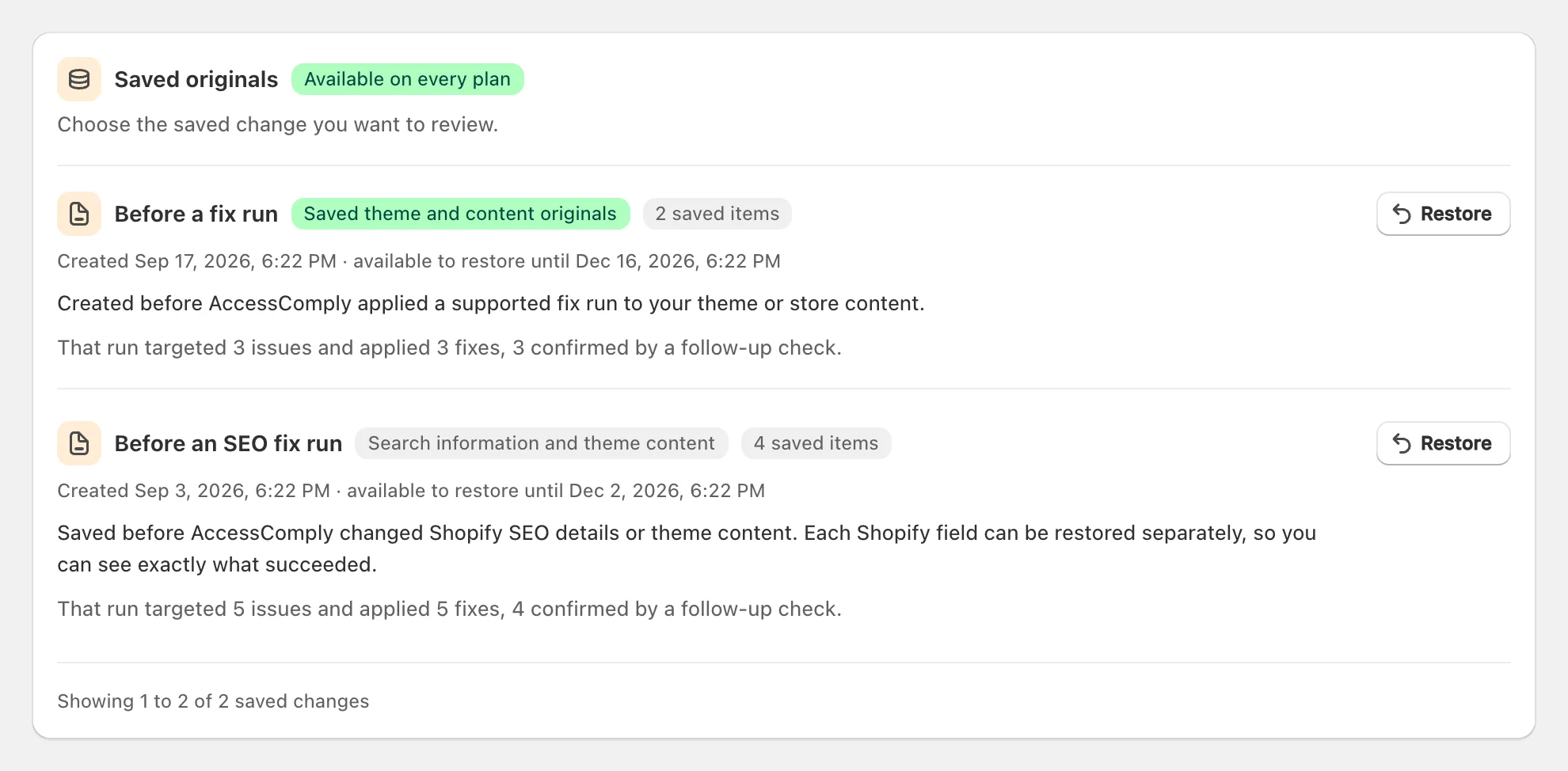
Originals saved, pages checked again
Before every run the files and content it changes are saved. The page is scanned again, and only fixes the check confirms count as fixed. Any run can be put back, and only when you say so.
No tool fixes everything
What it fixes, and what it hands back to you.
A tool that claims to fix every accessibility issue automatically is selling you something. AccessComply tells you which is which, finding by finding.
Written into your theme
- Text contrast, inside the section it was measured in
- A brand colour that fails, in the passing colour you pick
- Keyboard focus hidden under a sticky header or bar
- Form fields without labels
- A missing skip link or page language
- Page titles and descriptions on products, collections and pages
- Image descriptions and button labels, drafted by AI on Shield
Yours, with exact steps
- Tap targets smaller than 24 by 24 pixels
- Video captions, PDFs and your checkout
- Titles on pages Shopify does not let an app edit
- Anything that needs your judgement about your content
Belongs to another app
- Review widgets, chat, popups and upsells render their own markup
- AccessComply names the app, such as Judge.me or Klaviyo, and what to ask its support
Not an overlay
The fix lives in your theme, not in a script on top of it.
An overlay changes the page after it loads, so the theme underneath stays as it was and an audit of your code finds the same issues. In 2025 the FTC approved a final order requiring accessiBe to pay $1 million over claims its automated tool made sites conform. Read the FTC release.
- Where the fix goes
- AccessComply:Your theme files and Shopify content
- An overlay:A script layered over the page
- What an audit of your code finds
- AccessComply:The fixed code
- An overlay:The same issues as before
- Before a change
- AccessComply:The original is saved, and you approve
- An overlay:Nothing to approve
- After a change
- AccessComply:The page is scanned again
- An overlay:No follow up check
Pricing
Start free. Upgrade when you want every fix.
The free plan scans 3 times a month and fixes 3 issues every 30 days. Paid plans fix everything the rules can, and scan on a schedule.
Free
$0forever
See what stops shoppers, and fix the first few.
- 3 scans a month, up to 50 pages each
- 3 fixes every 30 days
- Speed, findability, accessibility and AI shopping readiness
- PDF report and an accessibility statement
Starter
$29a month
Every rule based fix, and a scan on a schedule.
- Unlimited scans and rule based fixes
- Up to 150 pages a scan
- A scheduled scan every month
- A rescan when your theme changes
- A dated work record and developer notes
Shield
Recommended$79a month
AI writes what rules cannot.
- Everything in Starter
- AI image descriptions and button labels
- A scheduled scan every week
- A rescan when products change
Citadel
$199a month
For a store that has to show its work.
- Everything in Shield
- A verified rescan with an evidence PDF each month
- A scheduled scan every day
- A founder review of each month’s results
- Your accessibility statement checked each month
Paid plans start with a 14 day free trial and bill through Shopify. Cancel any time.
Questions merchants ask
About the scan, the fixes, and what AccessComply will not claim.
- Each scan reads your storefront pages at a desktop and a phone width and checks four things: accessibility (automated checks against the WCAG AA rules, the newest included), speed (images and markup that slow a page), findability (page titles, descriptions and product data search engines read) and AI shopping readiness (whether ChatGPT, Google AI and other assistants can read your products). Every finding links to the page and the element it came from.
- No. An overlay adds a script that changes the page after it loads and leaves your theme as it was. AccessComply writes the fixes you approve into your theme files and Shopify content, where a developer would make them. An optional app embed adds a feedback button and a few storefront helpers, and you can switch it off at any time.
- Rule based fixes cover text contrast (written inside the theme section it was measured in), keyboard focus hidden under a sticky header or bar, form fields without labels, a missing skip link or page language, and page titles and descriptions on products, collections and pages. On Shield and Citadel, AI drafts image descriptions and labels for buttons and links. Findings inside another app’s widget, video captions, PDFs, your checkout and brand colour choices stay with you, with steps for each.
- AccessComply saves the theme files or content it is about to change, writes the change, then scans the page again. Only fixes that check confirms are counted as fixed. If a check finds a new problem, the change stays live and its saved original appears under Undo and restore. Nothing is put back until you say so.
- Yes. Open any fix to read the exact change, line by line, before you approve it. Or approve every ready fix in one press. Each run saves its originals and can be undone.
- No tool can promise that, and AccessComply does not. It finds and fixes common automated issues and keeps a dated record of the work, which helps if you ever need to show what you did. It is not legal advice or a certification.
- The European Accessibility Act sets accessibility requirements for covered online shops selling to people in the EU, and has been enforced since 28 June 2025. Whether it applies to your store depends on the Directive and each country’s rules. AccessComply checks the WCAG rules used as the technical benchmark and can map findings to the European accessibility standard in its reports. It does not decide whether the law applies to you.
- Free covers 3 scans a month and 3 fixes every 30 days, with no card. Paid plans start at $29 a month with a 14 day trial, billed through Shopify, and can be cancelled at any time.

See what your store is hiding from shoppers.
A free scan of up to 10 pages, with every finding tied to its page. Install when you want the fixes.